
0%

Shopify offers a wide range of built-in features and ready-made apps, but some businesses need functionality that standard solutions cannot provide. Unique workflows, internal systems, or complex integrations may require a solution built specifically for the store.
Shopify app development can help businesses connect external systems, automate processes, and add features tailored to their operations. A custom app gives merchants more control over how Shopify fits into their existing technology and business processes.
In this guide, we explain what custom Shopify apps are, when you may need one, how they differ from public and existing apps, and how to create and maintain a custom Shopify app in 2026.
What Are Custom Shopify Apps?
Custom Shopify apps are applications built for the specific requirements of a merchant. Unlike public apps designed for a broad merchant audience, custom apps support unique business processes, integrations, and functionality for one store or multiple stores within the same Shopify Plus organization.
Key Characteristics of Custom Apps
- Specificity – They are built around the unique business requirements, workflows, or systems of a particular merchant.
- Custom Distribution – Custom apps are not listed on the Shopify App Store and are distributed to a specific store or eligible stores within the same Shopify Plus organization.
- Enhanced Functionality – They can add features or integrations that existing Shopify solutions do not provide.
- Adaptability – Custom apps can evolve as business processes, integrations, and technical requirements change.
Why Choose a Custom App?
Opting for Shopify custom development offers several distinct advantages tailored to your business’s specific needs:
- Tailored Solutions – Custom Shopify app offers specialized solutions that address niche requirements, ensuring your store operates exactly as needed.
- Seamless Integration – These apps can be designed to integrate smoothly with third-party services or internal systems, enhancing overall efficiency.
- Brand Consistency – Custom apps that align with your brand’s identity deliver a user experience that is consistent and memorable.
- Competitive Advantage – With unique features and customized functionalities, custom apps provide your business with a competitive edge in the market.
When Do You Need a Custom Shopify App?
A custom Shopify app makes sense when existing apps cannot support a specific business process, integration, or technical requirement. It can be especially useful when your store needs:
-
ERP, CRM, or PIM integration to keep product, customer, inventory, or order data synchronized across systems.
-
Custom inventory or order workflows that standard Shopify functionality cannot support.
-
Custom checkout or backend functionality tailored to your business rules and operations.
-
Integration with internal business systems that require a custom Shopify integration.
-
Store-specific functionality that is not available in existing Shopify apps.
-
Process automation for repetitive tasks that otherwise require manual work.
Need a Custom Shopify App?Create a solution for custom workflows, business system integrations, and functionality that off-the-shelf Shopify apps cannot provide. Discuss Your App → |
Custom Shopify App vs Existing Shopify App
Before you invest in custom development, check whether an existing Shopify app can already meet your needs. Off-the-shelf apps are often the better choice for standard features, while custom apps make more sense when your business has unique workflows, integrations, or technical requirements.
| Existing Shopify App | Custom Shopify App |
|---|---|
| Best for common business needs | Best for unique business requirements |
| Faster to install and launch | Requires development and testing |
| Lower upfront cost | Higher initial investment |
| Limited by the app’s available features | Built around your workflows and systems |
| Updates depend on the app provider | You control the development roadmap |
| Suitable for standard integrations | Suitable for custom integrations and internal systems |
An existing Shopify app is usually the right choice when it already provides the features you need with minimal configuration. A custom app becomes more practical when ready-made solutions require too many workarounds, cannot connect to your internal systems, or do not support your business logic.
Shopify Custom Apps vs Public Apps
When planning Shopify app development, it is important to understand how custom apps differ from public apps. The right option depends mainly on who will use the app and how it needs to be distributed.
Custom Apps
Custom Shopify apps are built for a specific merchant and can be installed on a single store or multiple stores within the same Shopify Plus organization. They are not listed on the Shopify App Store.
Custom apps are a good fit when a business needs functionality tailored to its own processes, such as integrations with internal systems, custom workflows, or features that existing Shopify apps do not provide.
Public Apps
Public Shopify apps are built for multiple merchants and use public distribution. They can be distributed through the Shopify App Store, making them suitable for developers and businesses that want to offer the same application to a broader merchant audience.
Are Custom Apps the Same as Private Apps?
No. Private apps are a deprecated Shopify app type and should not be confused with custom apps. Shopify stopped supporting the creation of new private apps and automatically converted existing private apps to custom apps in January 2023. Today, businesses that need an app for a specific store or Shopify Plus organization should use a custom app instead.
How to Create a Custom Shopify App
A Shopify app project starts with a clear business problem and a defined set of required features. Custom Shopify app development can automate internal processes, connect Shopify with external systems, support unique workflows, or add features that existing apps do not provide.
If you want to learn how to build a Shopify app for your specific business needs, the process typically includes the following steps:
1. Set Up Your Development Environment
Start with access to the Shopify Dev Dashboard and a development store where you can safely build and test your app. Store owners can create and manage custom apps, while other users need the appropriate app development permissions.
Since January 1, 2026, new custom apps are managed through the Dev Dashboard. Legacy custom apps created before this date can still be managed directly from the Shopify Admin.
2. Choose Your Technology Stack
When choosing technologies for development, many developers find Node.js effective for server-side scripting and React useful for building interactive UIs. The Shopify CLI can be particularly valuable as it automates tasks and simplifies many aspects of the development process.
3. Initialize and Develop Your App
Use the latest Shopify CLI to create the app structure. Run shopify app init and select the React Router template, which Shopify recommends for most new apps.
After the app is created, run shopify app dev to connect it to a development store and start a local development server. You can then build and test your app before deployment.
4. Build Core Features
Focus on the features your app needs, such as inventory management, order workflows, or customer tools. Use Shopify’s GraphQL Admin API to access and manage store data. Shopify recommends GraphQL for new apps and integrations, while the REST Admin API is now considered legacy.
For the app interface, Shopify’s design system and official app components can help create an experience that feels consistent with the Shopify Admin.
5. Test and Debug
During this phase, thorough testing on your development store will help ensure all functionality works properly. Performance optimization leads to smoother operation, and implementing robust error-handling prepares your app to manage unexpected issues effectively.
6. Deploy Your App
After testing, release the app configuration and install the custom app on your live store through the Dev Dashboard. Shopify lets you manage app versions, access scopes, and configuration changes from the same dashboard.
After launch, monitor the app’s performance, review logs, and update it as Shopify APIs and your business requirements evolve.
Get in touch
with our expert
Discuss your project requirements and get a free estimate.
Get in touch
with our expert
Discuss your project requirements and get a free estimate.
Shopify App Development: Common Challenges and Solutions
Custom Shopify apps often connect several systems and depend on Shopify APIs, permissions, and platform updates. A reliable app should account for these requirements from the start.
API Limits and Performance
The GraphQL Admin API uses calculated query costs rather than a simple request limit. Keep queries focused, avoid unnecessary data requests, and use queues, caching, and retry logic with appropriate backoff for workloads that may approach Shopify's API limits. Review Shopify's API limits documentation when you plan high-volume integrations.
Authentication and Access Scopes
Use Shopify's current authentication tools and app templates instead of building authentication flows from scratch when possible. Request only the access scopes your app needs and review them when the app's functionality changes.
Webhooks and Event Handling
Use webhooks when your app needs to react to changes in Shopify, such as order, product, or customer updates. Validate incoming webhook requests and design the app to handle retries, duplicate events, and temporary failures without data loss. For high-volume integrations, process webhook events asynchronously.
Security
Protect app credentials and access tokens, use secure connections, and limit access to sensitive store data. Apply the principle of least privilege to API scopes and remove permissions the app no longer needs.
App Extensions
Use the appropriate Shopify app extension when your app needs to add functionality directly to Shopify interfaces. For apps that integrate with an online store theme, theme app extensions let you add app blocks and app embed blocks without direct changes to the theme code.
If an app integrates with a Shopify theme and will be distributed through the Shopify App Store, Shopify requires theme app extensions. Learn more in Shopify's online store app documentation.
API Versioning and Deprecated APIs
Shopify releases a new API version every three months. Specify a supported API version in your requests, review Shopify's developer changelog, and test updates before older versions or deprecated fields become unavailable. See Shopify's API versioning guide for current requirements.
Ongoing Maintenance
Custom apps require maintenance after launch. Monitor errors and API usage, review access scopes, test Shopify API updates, and update dependencies as needed to keep the app secure and compatible.
Create App for Shopify Store Using Transform Agency
Shopify custom development for your store is critical for building brand awareness and reaching new customers. While you can navigate through creating a Shopify app individually, you don’t have to go through the process alone – providers like Transform Agency can help you make the perfect Shopify app.
Transform Agency provides Shopify mobile app development services, so all e-commerce store owners can start selling on mobile devices with an accessible app experience.
Contact Transform Agency today to discuss your e-commerce project and start building the perfect Shopify application!
FAQ
What is the Shopify app for?
Shopify apps are designed to extend the functionality of your store, providing additional features such as inventory management, marketing tools, and customer engagement enhancements, tailored to specific business needs.
What is the difference between a custom and public Shopify app?
A custom Shopify app is built for a specific merchant and can be distributed to one store or multiple stores within the same Shopify Plus organization. A public app is designed for multiple merchants and can be distributed through the Shopify App Store.
Can a custom Shopify app integrate with an ERP or CRM?
Yes. A custom Shopify app can connect Shopify with ERP, CRM, PIM, and other business systems through APIs. This can help synchronize products, inventory, orders, customer data, and other information between Shopify and external platforms.
How to allow custom app development in Shopify?
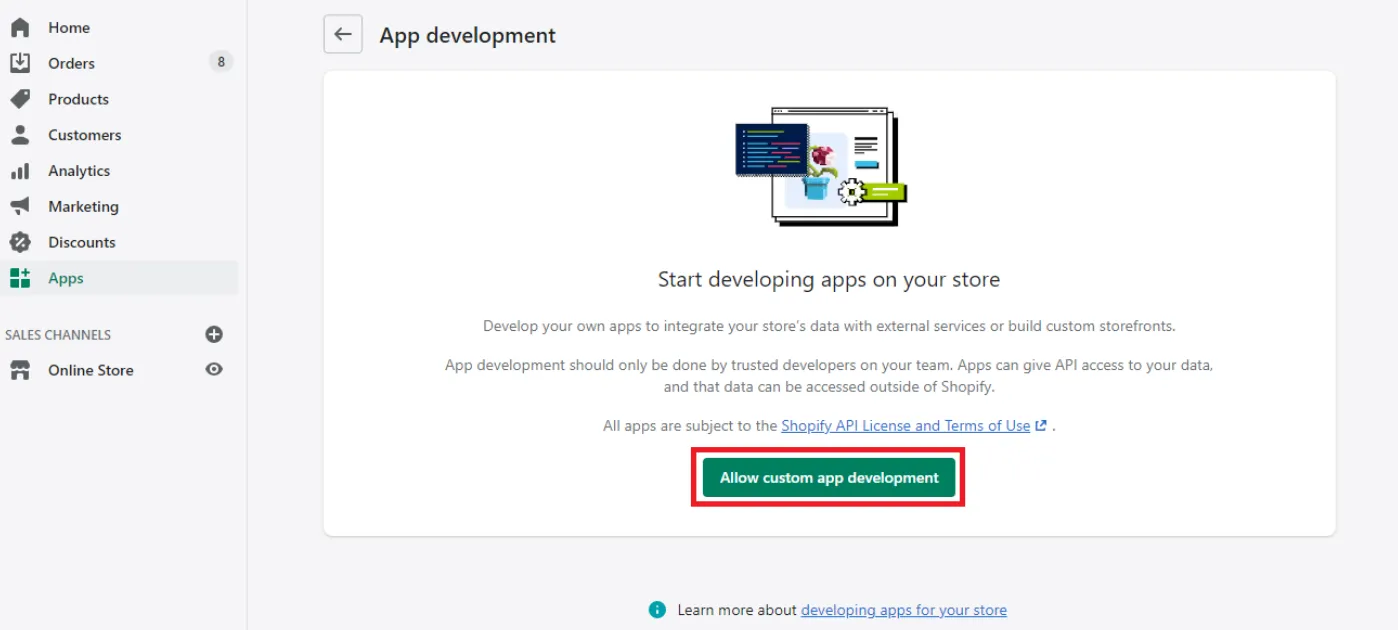
Store owners automatically have access to create and manage custom apps. To allow a staff member to work with custom apps, assign them the required App development permissions. New custom apps are created and managed through the Shopify Dev Dashboard.
How to create a custom app in Shopify?
You can create a custom Shopify app through the Dev Dashboard or use Shopify CLI for more feature-rich applications. Define the app’s required access scopes and functionality, develop and test it on a development store, and then install it on the target store.
Can you turn your Shopify store into an app?
Yes, you can transform your Shopify store into a mobile app using app builders available on the Shopify App Store, which make it easy to create a mobile-friendly application.
How much does it cost to develop a Shopify app?
The cost of developing a Shopify app varies widely depending on its complexity. Basic apps may start at a few thousand dollars, while more complex apps can be significantly more expensive. Keep in mind that ongoing maintenance and updates will also contribute to the overall cost.

Written with the assistance of Sergey Girlya
Adobe Commerce Business Practitioner | Certified PSM & PSPO at TA
Sergey ensures project success by validating business cases, defining success metrics, and identifying sustainable benefits. His proactive approach leverages existing systems, processes, and data to deliver additional value. Serge excels in planning, executing, monitoring, and controlling all aspects of the project lifecycle, ensuring meticulous attention to detail and strategic oversight.
Sergey ensures project success by validating business cases, defining success metrics, and identifying sustainable benefits. His proactive approach leverages existing systems, processes, and data to deliver additional value. Serge excels in planning, executing, monitoring, and controlling all aspects of the project lifecycle, ensuring meticulous attention to detail and strategic oversight.