
0%
In This Article:
What is a Payment Gateway Integration?
Preparing for E-commerce Payment Gateway Integration
Choosing a Payment Gateway: A Comparison Table
How to Integrate a Payment Gateway
Testing Payment Gateway Integration
Magento Payment Gateway Integration
How Much Does Payment Gateway Integration Cost?
Common Integration Challenges and Their Solutions
Best Practices for Secure Payment Gateway Integration
FAQs
Global e-commerce sales are projected to hit $8.03 trillion by 2027. As digital transactions continue to dominate the market, the demand for secure and efficient payment processing solutions is more critical than ever.
Yet, many online retailers face challenges in integrating payment gateways, which leads to increased cart abandonment and potential revenue loss.
This article offers step-by-step instructions to help you seamlessly integrate a payment gateway into your store, ensuring secure transactions and enhancing customer satisfaction.
What is a Payment Gateway Integration?
Payment gateway integration is the process of connecting a payment gateway to your online store or e-commerce platform. It enables your website to securely transmit payment transaction information to and from financial institutions, allowing you to efficiently handle payments from your customers.
Payment Gateway Integration Flow
A payment gateway connects your store with customers and payment providers to securely process transactions. The typical payment flow looks like this:
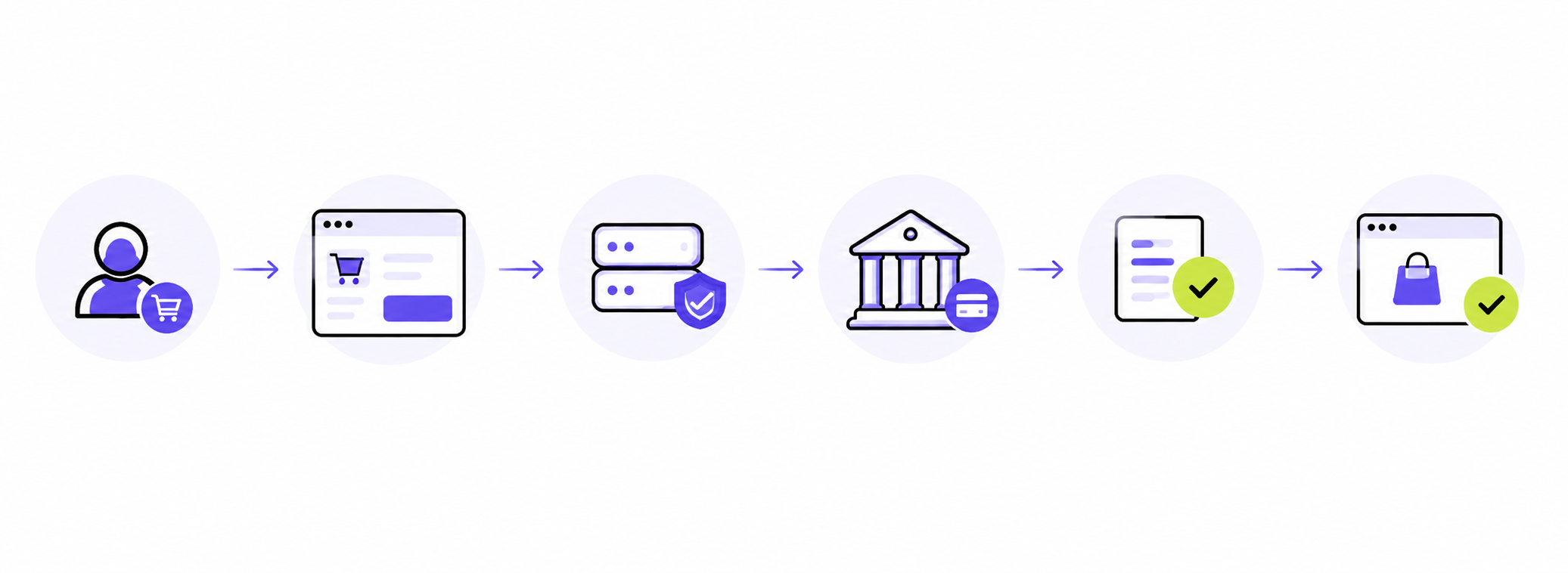
- Customer Initiates Payment: the customer selects a payment method during checkout and submits the payment request.
- Payment Gateway Securely Transfers Transaction Data: the gateway sends transaction details to the payment provider and applies the required security checks.
- Payment Provider Processes the Transaction: the bank or payment provider approves or declines the payment request and returns the result.
- Store Updates the Order Status: the payment confirmation is sent back to the store, which updates the order based on the transaction result.
Types of Payment Gateway Integration
- Hosted Payment Gateways – Redirects customers to the payment processor’s site for transactions, simplifying PCI compliance but potentially disrupting the user experience.
- Self-Hosted Payment Gateways – Collects payment data on your server before submitting it to the gateway, offering a seamless user experience but requiring enhanced security measures.
- API/Direct Integration – Connects payment gateways directly to your site via APIs, providing a custom, seamless checkout experience but necessitating technical expertise.
- Local Bank Integration – Directly integrates with local banks for payment processing, useful for targeting specific regions but may limit payment methods.
- Platform-Based Integration – Utilizes built-in payment solutions provided by e-commerce platforms, easing the integration process with minimal setup required.
Preparing for E-commerce Payment Gateway Integration
Before integrating a payment gateway into your online store, you need to have a clear plan and understand the key elements involved. Here’s what you need to consider:
| Aspect | Details |
|---|---|
| Documentation Needed | Prepare business licenses, bank account details, and tax information. |
| Compliance Requirements | Understand and prepare for compliance with PCI DSS and other security standards. |
| Technical Requirements | Assess technical specifications and ensure compatibility with your website's infrastructure. |
| Testing Environment | Set up a sandbox environment to conduct test transactions and ensure smooth integration. |
| Backup and Recovery Plans | Implement systems for backing up transaction data and have recovery plans ready. |
| Team Training | Train your team on payment gateway usage and troubleshooting common issues. |
| Integration Timeline | Develop a clear timeline, including milestones and deadlines for the integration process. |
| Customer Experience Strategy | Plan integration to fit into the customer journey, ensuring a seamless checkout process. |
Choosing a Payment Gateway: A Comparison Table
Choosing the right payment gateway is very important for your business. Here's a comparison of some popular options to help you make an informed decision:
| Gateway | Features | Pros | Cons | Best For |
|---|---|---|---|---|
| PayPal | Widely accepted, simple setup, strong security | Global reach, trusted brand | Higher transaction fees | Small to medium businesses seeking simplicity |
| Stripe | Developer-friendly API, customizable | Flexible, supports numerous integrations | Requires technical expertise | Tech-savvy businesses needing customization |
| Square | Easy-to-use, comprehensive POS system | No monthly fees, great for in-person sales | Limited international reach | Small businesses with physical locations |
| Authorize.Net | Robust functionality, detailed reporting | Reliable, good customer support | Setup can be complex | Established businesses needing advanced features |
| Adyen | Supports multiple payment methods, global reach | Highly scalable, strong fraud protection | Complex pricing structure | Large enterprises with international needs |
When selecting a payment gateway, consider the following factors:
- Payment Methods Supported – Ensure the gateway supports multiple payment methods, including the emerging digital currencies.
- Transaction Fees and Processing Times – Compare fees, keeping in mind how these could impact your profitability.
- User Reviews and Reliability – Research recent reviews and security updates to select a trustworthy option.
- Security Features – Look for gateways with strong encryption and fraud prevention tools to protect customer data.
- Customization Options – Check if the gateway offers customization to align with your brand's checkout process.
- Customer Support – Opt for a provider with responsive and helpful customer support to assist with any issues.
- Scalability – Consider whether the gateway can support your business growth and increase transaction volumes.
Evaluating these aspects helps you choose a solution that improves your payment processing and customer experience.
Get in touch
with our expert
Discuss your project requirements and get a free estimate.
Get in touch
with our expert
Discuss your project requirements and get a free estimate.
How to Integrate a Payment Gateway: Ready-Made Setup vs Custom Development
The integration approach depends on your platform, business requirements, and payment flow complexity. Some stores can connect a payment gateway using a ready-made extension or built-in integration, while others need custom development to support specific workflows.
Configure a Ready-Made Payment Gateway Integration
A ready-made integration allows merchants to connect a payment provider when a compatible extension or platform-supported solution is available.
The setup usually includes:
- Installing the payment gateway extension or enabling the built-in payment method.
- Adding API credentials and configuring test and live environments.
- Selecting supported payment methods, currencies, and payment options.
- Mapping payment statuses to order statuses.
- Testing transactions before launching the integration.
This option works well for standard payment scenarios where the provider already supports your e-commerce platform and business requirements.
Build a Custom Payment Gateway Integration
Custom payment integration is required when a store needs unique payment logic or when no suitable ready-made solution exists.
A custom integration typically involves:
- Connecting the e-commerce platform with the payment provider API.
- Developing payment flows for authorization, capture, refund, and void operations.
- Handling webhooks and synchronizing payment and order statuses.
- Managing payment errors, failed transactions, and edge cases.
- Ensuring compatibility with checkout, order management, and other connected systems.
Unlike ready-made solutions, custom integrations require additional development, testing, and security considerations to ensure reliable payment processing.
Testing Payment Gateway Integration
Before launching a payment gateway integration, thorough testing helps ensure that payments, refunds, and order updates work correctly in real customer scenarios. Use a sandbox environment to verify different payment flows without affecting live transactions.
Key scenarios to test include:
- Successful Payment: confirm that completed transactions are processed correctly and orders receive the right status.
- Declined Card Payment: verify that failed transactions are handled properly and customers receive clear error messages.
- 3-D Secure Verification: test both successful and failed authentication flows.
- Full and Partial Refunds: ensure refund requests are processed correctly and order statuses are updated.
- Repeated Payment Attempts: check how the system handles duplicate or repeated payment requests.
- Delayed or Failed Webhook Delivery: verify that payment updates are synchronized correctly even when webhook responses are delayed.
- Customer-Abandoned Payment Flow: test what happens when a customer leaves checkout before completing payment.
- Payment Completed but Order Not Updated: ensure the system can detect and handle cases where the payment succeeds but the order status remains unchanged.
After testing, review transaction logs, confirm payment status synchronization, and verify that the integration works correctly before moving to production.
Magento Payment Gateway Integration
Magento payment gateway integration can be implemented in different ways depending on your business requirements, available payment providers, and the level of customization needed.
Built-In or Supported Payment Methods
Magento includes support for common payment methods that can be configured directly in the Admin panel. This option works well for standard payment flows where available features meet your business needs.
Ready-Made Magento Payment Extensions
Payment providers and third-party developers offer Magento extensions that simplify integration with specific gateways. These solutions usually include pre-built payment flows, configuration settings, and support for common transaction scenarios.
Custom Payment Method Module
Custom Magento payment integrations are required when a store needs unique payment logic or additional functionality that is not available through existing solutions.
A custom payment module may include:
- Configuring a payment method in Magento Admin.
- Implementing authorization, capture, refund, and void operations.
- Processing webhooks and synchronizing payment statuses with order statuses.
- Ensuring compatibility with checkout, themes, Hyvä, and other installed extensions.
- Testing the integration after Magento upgrades.
Custom development allows businesses to create a payment flow that matches their operational requirements while maintaining reliable order and payment processing.
How Much Does Payment Gateway Integration Cost?
The cost and timeline of payment gateway integration depend on the complexity of the project, the chosen solution, and the level of customization required. A ready-made integration usually requires less effort, while custom development involves additional work on payment flows, security, and testing.
Several factors can affect the project scope:
| Factor | How It Affects the Project |
|---|---|
| Integration approach | Ready-made extensions usually require configuration, while custom integrations require development and additional testing. |
| Payment methods and currencies | Supporting multiple payment methods, regions, and currencies increases configuration and testing requirements. |
| Subscriptions and saved cards | Recurring payments require additional logic for managing renewals, payment tokens, and failed charges. |
| 3-D Secure requirements | Additional authentication flows may require extra configuration and testing. |
| Refunds and payment operations | Full refunds, partial refunds, captures, and voids require proper payment flow implementation. |
| ERP or accounting integrations | Connecting payment data with external systems adds integration complexity. |
| Provider certification | Some payment providers require additional reviews or certification before launch. |
| Testing and security requirements | Additional testing scenarios and security checks increase the overall project effort. |
Common Integration Challenges and Their Solutions
Integrating a payment gateway can present various challenges. Here’s how to tackle some of the most common issues:
- Integration Errors – Mistakes in API keys or configuration settings can lead to integration errors. Double-check all inputs and ensure compatibility with your platform. Utilize detailed documentation and support from your payment gateway provider to resolve issues.
- Transaction Failures – Transaction failures may occur due to network issues, incorrect payment details, or insufficient funds. Ensure your system provides clear error messages to customers and offers alternative solutions.
- Security Concerns – Security vulnerabilities can pose significant risks. Regularly update your security protocols and monitor for suspicious activities. Implement robust encryption and multifactor authentication to safeguard sensitive data.
- Compliance Issues – Staying up-to-date with compliance standards like PCI DSS is key. Conduct regular audits to identify gaps and address them promptly.
- Customer Experience Challenges – A complicated checkout page can lead to cart abandonment. Simplify the process by providing intuitive navigation and multiple payment options (credit cards, digital wallets). Regularly test the user experience and gather feedback to make necessary improvements.
- Technical Support – Lack of technical support can hinder timely issue resolution. Choose a payment gateway provider with strong customer support, which offers quick access to experts who can assist with technical difficulties.
Best Practices for Secure Payment Gateway Integration
A secure payment gateway integration requires more than encrypted connections and HTTPS. Merchants should protect payment data, manage credentials properly, and follow security standards based on the chosen integration approach.
Use Tokenization to Protect Payment Data
Tokenization replaces sensitive card information with secure tokens, allowing payments to be processed without storing actual card details in your store. Hosted fields and tokenized payment solutions can reduce the amount of sensitive data that passes through your infrastructure and simplify compliance requirements.
Follow PCI DSS Requirements
PCI DSS compliance requirements depend on how the payment integration is implemented. Hosted payment solutions usually reduce the amount of cardholder data handled by the store, while direct integrations require additional security controls.
Secure API Keys and Credentials
Protect payment provider credentials by:
- Storing API keys securely and preventing exposure in code repositories.
- Separating test and live credentials.
- Limiting access to payment configuration settings.
Verify Webhook Requests
Webhooks are used to send payment updates back to the store. Always verify webhook signatures before processing payment events to prevent unauthorized requests.
Avoid Storing Sensitive Payment Data
Do not store card details, API secrets, or payment credentials in databases, application logs, or other insecure locations. Restrict access to payment-related settings and sensitive transaction information.
Final Thoughts: How to Integrate a Payment Gateway in a Website
Choosing the right gateway can streamline payment processing, improve the user experience, and ultimately boost customer satisfaction and sales. When you understand how payment gateways work and review popular options, you find the best fit for your store.
While navigating the selection and integration process might seem complex, you don’t have to struggle alone. Reach out to our expert team to streamline your payment systems integration and ensure a secure transaction experience for your customers.
FAQs
What is payment gateway integration?
It connects your e-commerce platform to a payment gateway, enabling secure online transactions through efficient payment gateway integration services, allowing you to accept payments seamlessly.
Which payment gateway is best to integrate?
The best gateway depends on your business needs and customer preferences. Popular choices include PayPal, Stripe, and Square. Consider features, fees, and compatibility when choosing an option for e-commerce payment gateway integration.
How can I integrate a payment gateway?
Select a provider, create a merchant account, obtain API keys, and follow the setup instructions. Testing and implementing security measures are crucial steps in the process. Utilizing payment gateway integration services can streamline this process.
What are the different types of payment gateway integration?
Types include hosted gateways that redirect transactions to a third-party site, self-hosted gateways that process transactions on your site, API integration for a seamless checkout, and platform-based integration with built-in solutions from platforms.

A seasoned product manager specializing in e-commerce, Helen excels in market analysis and strategic marketing for Magento platforms.
A seasoned product manager specializing in e-commerce, Helen excels in market analysis and strategic marketing for Magento platforms.