
0%
In This Article:
88% of online consumers are less likely to return to a website after a bad user experience. For e-commerce businesses, this means that confusing navigation, slow pages, unclear product information, or a complicated checkout can directly impact sales and customer loyalty.
An e-commerce UX audit helps identify these hidden conversion barriers and reveals what prevents shoppers from completing purchases.Understanding what e-commerce UX is helps businesses recognize how design, usability, and functionality influence customer decisions throughout the shopping journey.
In this article, we’ll explore a practical UX audit checklist to help you evaluate your store experience and find opportunities to improve conversions.
What Is an E-commerce UX Audit?
An e-commerce UX audit is a structured evaluation of an online store’s user experience to identify usability issues, conversion barriers, and opportunities for improvement. It examines how easily customers can navigate the website, find products, make purchase decisions, and complete checkout.
Unlike a general website review, a UX audit focuses on the entire shopping journey, analyzing elements such as site navigation, search, product pages, checkout flow, mobile experience, performance, and trust signals to understand what may prevent visitors from converting into customers.
Why E-commerce UX Audits Matter for Conversion Rates
A well-designed store does more than create a visually appealing experience; it helps customers find products faster, make confident decisions, and complete purchases with fewer obstacles. A UX audit helps uncover the issues that create friction throughout the shopping journey and identifies areas where improvements can have the biggest impact on conversions.
A comprehensive e-commerce UX audit helps you:
- Find conversion blockers — identify usability issues that make visitors leave without completing a purchase.
- Improve product discovery — help shoppers find relevant products faster through better navigation, search, and category organization.
- Optimize the checkout experience — remove unnecessary steps and reduce friction that leads to cart abandonment.
- Increase customer confidence — strengthen trust with clearer information, intuitive design, and a smoother buying process.
- Prioritize UX improvements — focus on changes based on user behavior, analytics data, and potential business impact.
Is UX Costing You Customers?
Find UX issues and turn more visitors into buyers.
E-commerce UX Audit Checklist: Key Areas to Review
An e-commerce UX audit covers multiple touchpoints that influence how customers interact with your store. When you review each stage of the shopping journey, you can identify friction points, understand user behavior, and prioritize improvements that have the greatest impact on conversions.
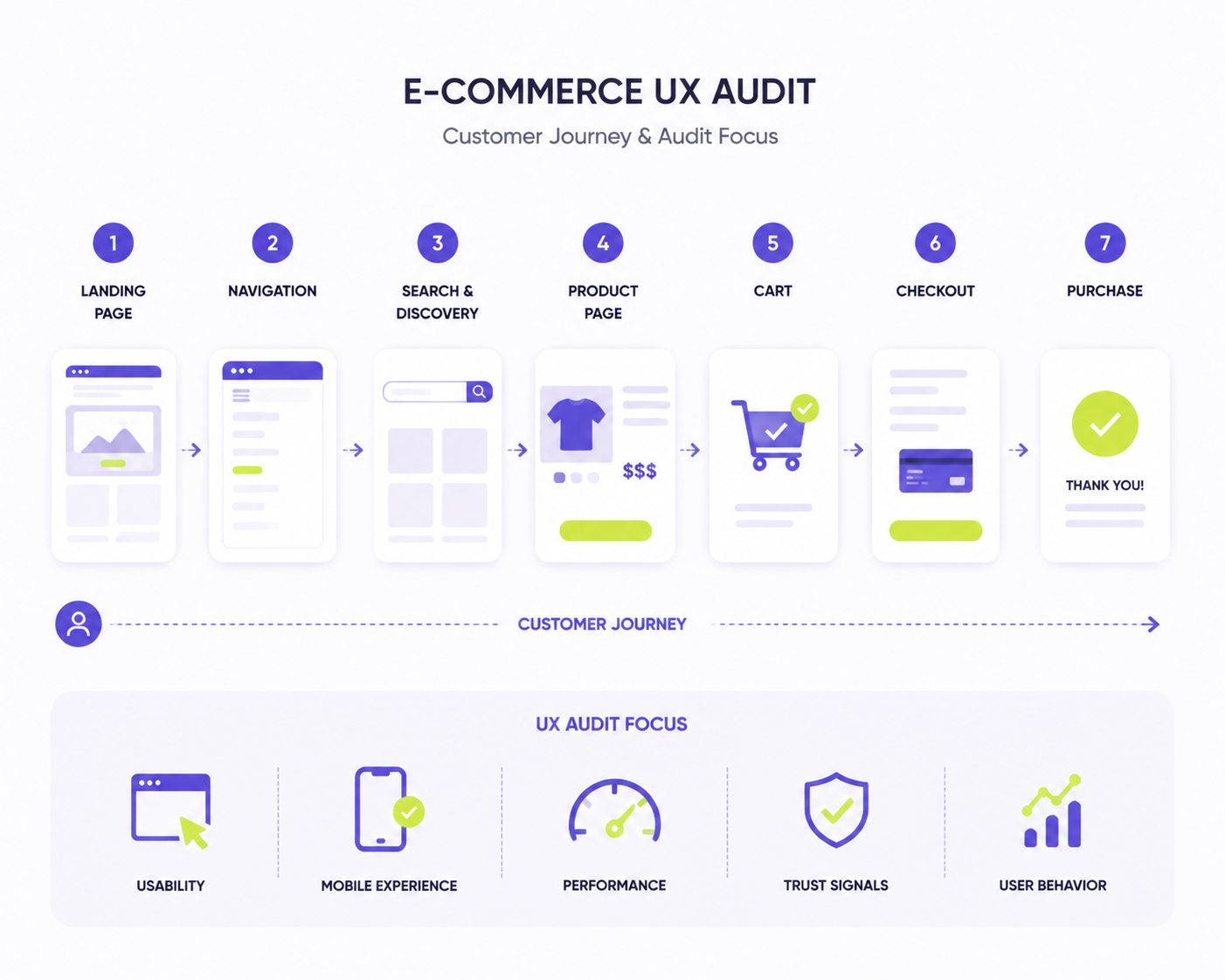
E-commerce UX audit helps evaluate every step of the customer journey from discovering products to completing a purchase to identify opportunities for improvement.
1. Website Navigation and Information Architecture
Your website navigation should help customers quickly understand your store structure and find the products they need without unnecessary effort. A confusing menu, unclear categories, or too many steps between pages can increase frustration and lead shoppers to leave.
Check:
- Is the main navigation clear and easy to use?
- Can customers find important pages within a few clicks?
- Are categories organized based on customer expectations?
- Do filters, sorting options, and breadcrumbs help users navigate efficiently?
2. Search and Product Discovery
For stores with large catalogs, search is one of the most important tools for helping customers find relevant products. A poor search experience can prevent shoppers from discovering products they would otherwise purchase.
Check:
- Does search provide relevant results quickly?
- Does it handle typos, synonyms, and different search terms?
- Are filters and sorting options useful for narrowing choices?
- Can customers easily compare and explore available products?
3. Product Page Experience
Product pages play a key role in converting visitors into buyers. They should provide enough information to answer customer questions, build confidence, and make the purchase decision easier.
Check:
- Are product images high-quality and informative?
- Is key information such as price, availability, and options easy to find?
- Are descriptions clear and focused on customer needs?
- Are reviews, ratings, and trust signals visible?
- Is the add-to-cart action clear and easy to access?
4. Cart and Checkout Optimization
The checkout process is one of the most critical stages of the customer journey. Even interested shoppers may abandon their purchase if checkout feels complicated, requires unnecessary steps, or lacks transparency.
Check:
- Are there unnecessary fields or steps in checkout?
- Are shipping costs and payment options clearly presented?
- Can customers complete purchases easily on mobile devices?
- Are error messages clear and helpful?
- Are guest checkout and convenient payment methods available?
5. Mobile User Experience
With a growing number of purchases happening on mobile devices, a seamless mobile experience is essential for e-commerce success. A store that works well on desktop but creates difficulties on smaller screens can lose potential customers.
Check:
- Is the website fully responsive?
- Are buttons and interactive elements easy to use on mobile?
- Is product information easy to view and scroll through?
- Does the checkout process work smoothly on mobile devices?
6. Website Performance and Speed
Page speed directly affects usability and customer satisfaction. Slow-loading pages create frustration and increase the chance that visitors will leave before exploring products or completing a purchase.
Check:
- Do pages load quickly across devices?
- Are images and media optimized?
- Are there unnecessary scripts affecting performance?
- Does the store maintain good Core Web Vitals scores?
7. Trust Signals and Customer Confidence
Customers need to feel confident before making a purchase. A UX audit should evaluate whether your store provides enough information and reassurance throughout the buying journey.
Check:
- Are customer reviews and ratings easy to find?
- Are return policies and delivery information clear?
- Are security indicators and payment options visible?
- Does the store design look professional and reliable?
8. Analytics and User Behavior Data
UX decisions should be supported by real customer behavior, not assumptions. Analytics data helps identify where users struggle and which areas of the store have the greatest improvement potential.
Check:
- Where do users drop off during the shopping journey?
- Which pages have high exit rates?
- Are there differences between desktop and mobile behavior?
- Are users interacting with key elements as expected?
How to Perform an E-commerce UX Audit: Step-by-Step Process
A UX audit combines research methods to understand how customers interact with your store and identify issues that affect conversions.
| Step | What to Review | Key Questions |
|---|---|---|
| 1. Analyze User Behavior | Customer journeys, conversion funnels, drop-off points, and user interactions | Where do visitors leave the store? Which pages create friction? How do users navigate through the buying journey? |
| 2. Conduct a Usability Review | Navigation, product discovery, shopping flow, and checkout experience | Can customers complete key tasks easily? Is the path from browsing to purchase clear and intuitive? |
| 3. Evaluate Mobile Experience | Responsive design, mobile navigation, product pages, and checkout usability | Does the store provide a smooth experience across mobile devices? Are all interactions easy on smaller screens? |
| 4. Check Performance and Technical Factors | Page speed, Core Web Vitals, loading issues, and technical errors | Are slow pages or technical problems affecting user experience and conversions? |
| 5. Prioritize UX Improvements | Business impact, customer impact, and implementation effort | Which changes can remove the biggest conversion barriers and provide the highest return? |
For businesses that do not have dedicated UX specialists in-house, working with experienced UX design agencies for online stores can help identify hidden usability issues, analyze customer behavior, and create a clear roadmap for improving the shopping experience.
Common E-commerce UX Mistakes and How to Fix Them
UX issues can appear at any stage of the shopping journey and create friction that prevents customers from completing purchases. A UX audit helps identify these problems and define the right improvements.
1. Complicated Navigation
Customers may struggle to find products because of unclear menus, confusing categories, or too many navigation steps.
Solution: Simplify your site structure, organize categories based on customer expectations, and improve filters, sorting, and breadcrumbs.
2. Poor Search Experience
Shoppers may leave when search results are inaccurate, irrelevant, or difficult to refine, preventing them from discovering the right products.
Solution: Optimize search with relevant results, typo tolerance, synonyms, and effective filtering options.
3. Weak Product Pages
Customers may hesitate to purchase when product pages lack important details, clear visuals, or information needed to make a confident decision.
Solution: Improve product pages with detailed descriptions, high-quality images, reviews, clear pricing, and prominent calls to action.
4. Complicated Checkout Flow
A lengthy or unclear checkout process can create frustration and cause customers to abandon their carts before completing a purchase.
Solution: Reduce unnecessary fields, offer guest checkout, display costs clearly, and provide convenient payment options.
5. Poor Mobile Experience
Mobile users may face difficulties navigating the store, viewing products, or completing purchases if the experience is not optimized for smaller screens.
Solution: Ensure responsive design, optimize mobile interactions, and test the complete shopping journey across different devices.
6. Slow Website Performance
Slow-loading pages and technical issues can negatively affect user experience and increase the chance that visitors leave the store.
Solution: Optimize images, reduce unnecessary scripts, and improve technical performance to create a faster shopping experience.
7. Lack of Trust Signals
Customers may hesitate to complete purchases when they cannot find enough information about security, delivery, returns, or other important details.
Solution: Add customer reviews, clear policies, secure payment information, and other trust elements that increase purchase confidence.
How to Measure the Impact of UX Improvements
UX optimization is an ongoing process. After implementing changes, businesses should track key performance indicators to understand whether improvements make the shopping experience smoother and contribute to better conversion results.
Measure UX improvements by tracking:
- Conversion rate — understand whether UX changes help more visitors complete purchases and improve overall store performance.
- Cart abandonment rate — identify whether checkout improvements reduce the number of customers who leave before completing their orders.
- User engagement metrics — analyze changes in time on site, pages viewed, and product interactions to evaluate how customers navigate the store.
- Customer behavior insights — use analytics tools, heatmaps, and session recordings to identify remaining friction points and understand user actions.
- Customer feedback — collect insights from surveys, reviews, and support interactions to discover additional usability issues and improvement opportunities.
Improve Your E-commerce UX with Expert Support
A successful e-commerce store needs more than great products, it needs a seamless experience that helps customers find, evaluate, and purchase with ease.
Transform Agency helps businesses identify UX issues, optimize customer journeys, and implement improvements that increase usability and conversions. Contact us to discover how a data-driven UX approach can help remove conversion barriers from your store.
FAQ
Why does an online store need a UX audit?
An e-commerce UX audit helps identify usability issues that prevent customers from completing purchases. It reveals friction points in navigation, product discovery, checkout, and other parts of the shopping journey, allowing businesses to make targeted improvements that can increase conversions.
What should be included in an e-commerce UX audit?
A comprehensive UX audit should review key areas that affect customer experience, including website navigation, search, product pages, checkout flow, mobile usability, website performance, trust signals, and user behavior analytics.
What are the most common e-commerce conversion barriers?
Common conversion barriers include confusing navigation, poor search functionality, incomplete product information, complicated checkout processes, slow page speed, and a lack of trust elements such as reviews or clear policies.
How often should an e-commerce UX audit be done?
The frequency depends on the size and complexity of your store, but a UX audit is recommended at least once a year or after major website updates, redesigns, new feature launches, or changes in customer behavior.

Expert in creating engaging written content. Skilled at analyzing audience behaviors and refining strategies to align business goals with customer interests. Proven ability to craft content that connects deeply with audiences. Passionate about staying current with trends to boost engagement.
Expert in creating engaging written content. Skilled at analyzing audience behaviors and refining strategies to align business goals with customer interests. Proven ability to craft content that connects deeply with audiences. Passionate about staying current with trends to boost engagement.