
0%
Whether it's implementing advanced search filters, integrating specialized payment gateways, or crafting product recommendations, the development of custom functionalities for Shopify stores is always a strategic investment in long-term success. By tailoring features to align with your specific business goals, you can foster increased engagement, streamline operations, and ultimately boost sales through powerful Shopify integration.
This article will serve as your Shopify customization tutorial that focuses on the nature and use cases of Shopify webhooks and APIs – two major ways of adding new features to your store.
Exploring Shopify API (Application Programming Interfaces)
The Shopify API acts as a bridge, allowing external applications to interact with a store's data, permitting the retrieval, modification, and creation of various entities. Through the Shopify API, developers can extend the capabilities of a Shopify store beyond its native features. This extensibility empowers businesses to adapt and scale by integrating third-party tools and building custom solutions that can be surfaced through Shopify themes customization.
There are primarily two types of APIs employed by Shopify:
REST APIs
These APIs provide a direct and uncomplicated method for developers to interact with resources through standard HTTP methods. REST API architecture simplifies the process of accessing and modifying data, making it an ideal choice for straightforward operations within the Shopify ecosystem. With REST, you can enhance your custom Shopify store with features like:
- Product updates.
- Customer information retrieval.
- Order management.
GraphQL APIs
This API type introduces a more dynamic and efficient approach to handling data. GraphQL empowers developers by allowing them to specify the exact information they need, minimizing data transfer and enhancing performance. This makes it a preferred choice for applications where precision and efficiency are paramount. Developers leverage GraphQL to craft:
- Sophisticated queries.
- Retrieve specific data subsets.
- Create a responsive user experience.
Understanding Shopify Webhooks
While APIs are sets of rules and protocols that facilitate communication between different software applications, webhooks serve as a mechanism for Shopify to relay real-time information to external applications. They are HTTP callbacks triggered by specific events occurring within the Shopify store, which allows external systems to stay updated without the need for incessant polling.
A Shopify webhook example could be an “order creation” event triggering a notification to an external system, like a shipping service, to process and fulfill the new order automatically. This involves Shopify sending a payload with relevant order details (customer information, product details) to a specified endpoint, allowing seamless integration and automation in e-commerce operations.
Shopify offers various types of webhooks, each designed for various specific events. Here’s an incomplete list of Shopify webhooks:
- Order Webhooks – Notify external systems when orders are created, updated, or fulfilled.
- Product Webhooks – Triggered upon product creation, update, or deletion, providing real-time product-related event notifications.
- Customer Webhooks – Alert external systems to changes in customer information, including new registrations or profile updates.
- Cart Webhooks – Keep external systems informed about changes in shopping carts, aiding in real-time cart tracking and analysis.
- Shop Webhooks – Notify external applications of changes to the store settings, facilitating synchronization with external databases or tools.
- App Uninstalled Webhooks – Triggered when a Shopify app is uninstalled, enabling developers to manage post-uninstallation processes effectively.
- Inventory Webhooks – Provide updates on inventory changes, ensuring external systems are informed about product stock levels in real-time.
- Fulfillment Webhooks – Alert external systems to changes in order fulfillment status, aiding in logistics and order tracking processes.
Choosing Between API and Webhooks
The right choice depends primarily on whether your application needs to ask for data or needs to be told about events.
Functionality and Use Cases
- APIs are best suited for tasks involving data retrieval, manipulation, and integration, where real-time updates are not a critical requirement.
- Webhooks are Ideal for scenarios requiring instant updates, such as notifications, live feeds, and real-time collaboration.
Real-Time Updates vs. Batch Processing
- APIs can handle real-time interactions, but the frequency might be limited by the polling intervals set by the client. Yet, they are excellent for tasks involving bulk data transfer, processing, and synchronization.
- Webhooks are well-suited for applications requiring immediate response to events, like chat applications, live feeds, or stock market updates. However, they’re not the optimal choice for bulk data processing due to their event-driven nature.
Scalability
- APIs are typically more scalable, especially when dealing with batch processing. API data can be transferred in larger chunks, reducing the overhead associated with individual requests.
- Webhooks might face challenges with scalability when dealing with a large number of events, as each event triggers a separate HTTP request.
Security
- A core pillar of any Shopify security strategy involves understanding how your integration points handle data. APIs offer more control over data access and authentication mechanisms, providing a structured approach to securing data communication.
- Webhooks require secure endpoint handling, as any compromise in the webhook endpoint can lead to unauthorized access or data leakage. Regardless of your choice, adhering to Shopify’s best practices for API authentication and webhook validation is non-negotiable for maintaining a secure store.
Maintenance
- APIs involve managing versioning, and documentation, and ensuring backward compatibility, but typically follow a more structured and controlled process.
- Webhooks require monitoring and validation of incoming requests to ensure they are legitimate and not abused.
Practical Decision Guide: API vs Webhooks
To consolidate the concepts, here is a practical guide in table format to help you decide which tool is the right fit for your specific scenario. This quick-reference chart compares key aspects side-by-side, followed by a simple decision flowchart.
| Aspect | Use an API (REST/GraphQL) | Use a Webhook |
|---|---|---|
| Primary Direction | Your app asks Shopify for data or sends commands outward. (Client-initiated) | Shopify tells your app about an event inward. (Event-driven / Shopify-initiated) |
| Best For | Pulling data on-demand, updating/canceling orders, searching, bulk operations, complex queries (GraphQL). | Instant reactions to specific shop events (order created, customer updated), real-time sync, automating notifications. |
| Data Flow Control | You control the timing and frequency of requests (e.g., polling every hour). | Shopify controls the timing; you must be ready to receive the payload immediately when the event occurs. |
| Performance Consideration | Can lead to inefficient "over-fetching" (REST) or unnecessary polling if used to check for events. | Highly efficient for event response; no constant polling required. Your endpoint must handle spikes in traffic (e.g., during a flash sale). |
| Complexity & Setup | You must write code to construct requests, handle pagination, and manage API rate limits. | Simpler event-driven logic. You must set up a secure, public HTTPS endpoint to receive payloads and verify webhook authenticity. |
| Example Use Case | A nightly job to sync all new orders to an ERP system. A dashboard fetching analytics. A custom app updating product tags. | Instantly sending order details to a 3PL warehouse when an order is paid. Updating a CRM when a customer's profile changes. Triggering a welcome SMS on sign-up. |
Quick decision flowchart:
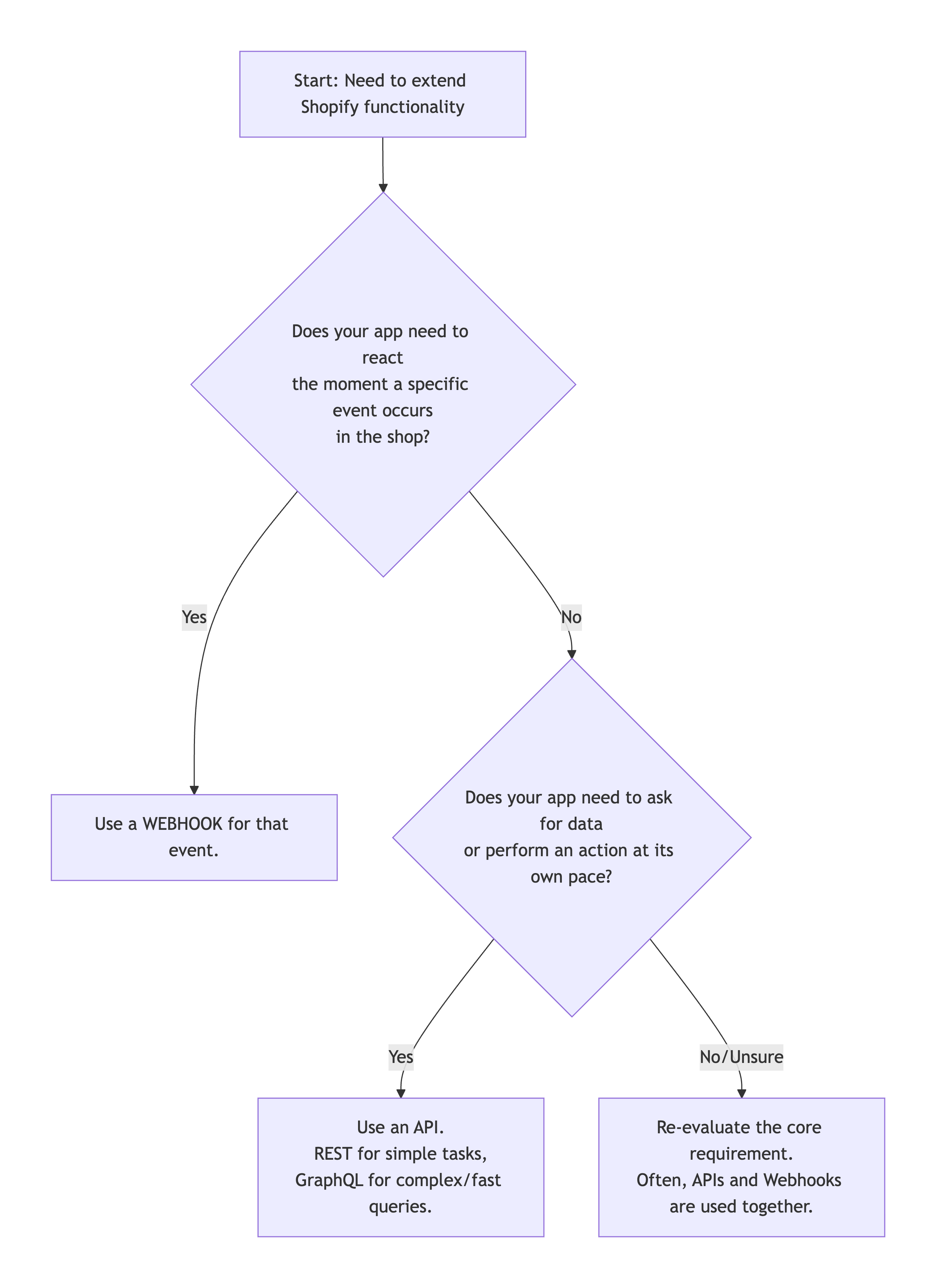
In practice, robust integrations often leverage both tools. For example, when a order/paid webhook is received, your application might then use the Order API to fetch the full order details and the Fulfillment API to create a fulfillment record. By understanding the strengths of each, you can architect efficient, scalable, and responsive custom solutions for Shopify.
Recap
The choice between webhooks and APIs depends on the specific needs of your application. Both have their strengths and weaknesses, and a careful consideration of functionality, use cases, scalability, security, and maintenance requirements will guide you toward the most suitable solution for your development goals.
Use webhooks for applications requiring immediate updates, such as real-time notifications and collaboration platforms, but opt for APIs when dealing with batch processing, data retrieval, and integration where real-time updates are not critical. Consider security implications when choosing between webhooks and APIs, especially in scenarios where data privacy is a primary concern. Finally, evaluate the scalability requirements, as APIs might be more suitable for handling larger volumes of data.
FAQ
Does Shopify allow API integration?
Yes, absolutely. Shopify is built with a strong focus on developer-friendly API integration. It provides a suite of APIs (including REST and GraphQL) that allow you to connect external applications, custom build features, automate workflows, and sync data between Shopify and other business systems (like ERP, CRM, or custom databases).
Is the Shopify REST API deprecated?
No, the Shopify REST Admin API is not deprecated. It is fully supported and actively maintained alongside the newer GraphQL Admin API. Shopify encourages the use of GraphQL for new integrations due to its efficiency in fetching specific data, but the REST API remains a reliable and powerful option for many use cases.
Does Shopify support WebHooks?
Yes, Shopify has robust support for WebHooks. You can use WebHooks to receive near real-time notifications about events in a shop (such as order creation, product updates, or customer data changes). These HTTP callbacks (POST requests) are sent to your app's specified endpoint, allowing you to react automatically to events without constantly polling the API.
Are WebHooks REST APIs?
No, WebHooks are not REST APIs. They are complementary technologies:
-
REST API is a request-response model where your app calls Shopify to retrieve or send data.
-
WebHooks are a push model where Shopify calls your app to notify it of an event.
Think of the REST API as you asking Shopify for information, and WebHooks as Shopify proactively sending you information when something important happens.
Get in touch
with our expert
Discuss your project requirements and get a free estimate.
Get in touch
with our expert
Discuss your project requirements and get a free estimate.

Written with the assistance of Sergey Girlya
Adobe Commerce Business Practitioner | Certified PSM & PSPO at TA
Sergey ensures project success by validating business cases, defining success metrics, and identifying sustainable benefits. His proactive approach leverages existing systems, processes, and data to deliver additional value. Serge excels in planning, executing, monitoring, and controlling all aspects of the project lifecycle, ensuring meticulous attention to detail and strategic oversight.
Sergey ensures project success by validating business cases, defining success metrics, and identifying sustainable benefits. His proactive approach leverages existing systems, processes, and data to deliver additional value. Serge excels in planning, executing, monitoring, and controlling all aspects of the project lifecycle, ensuring meticulous attention to detail and strategic oversight.